Your Bill Explained
Options
- Mark as New
- Mark as Read
- Bookmark
- Subscribe
- Printer Friendly Page
- Report this post
Unless you have chosen the paper billing option, your bill will be available online each month.
NB: The following is just a sample of what the bill pages look like for reference - your bill will contain details relevant to your account.
To view your bill online, log in to your My3 Account. From the dashboard, go to 'View All Bills'.
Click here to go directly to the View My Bill Page.
You will then see your most recent bill. You can view previous bills by changing the date in the top left-hand corner of the page. You can also download a PDF version of your bill.
Please see details below about your 'Your Bill Explained' and on this page, below, you'll find a link to other helpful topics:
Bill Explanation
Page 1
A summary of your bill. NB: The following is just a sample of what this page looks like for reference - your bill will contain details relevant to your account.
At the top of your bill, you will see the following information:
- Your account number is the unique number associated with your account. If you contact us regarding your bill, this is the number that you should mention to us.
- Your bill number is the unique reference number for your bill.
- Your bill date is the date that your bill is generated.
- If you have an account with more than one number, this will display under ‘number of connections’.
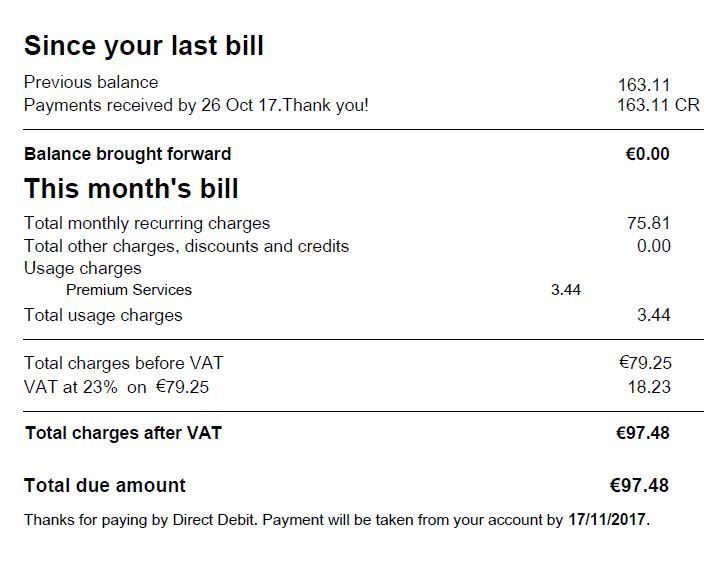
This page contains the following sections:
| Section | Explanation |
| Barcode | The barcode will be displayed on the top of the first page of your bill and will support the mail returns process. |
| Since your last bill | Shows all payments received since your last bill, along with any adjustments made on your bill. Balance Brought forward tells you the amount carried forward from your last bill. |
| This month's bill |
Your monthly charges will appear here along with any additional charges, discounts or credits.
Usage charges, where relevant, will appear. Usage charges are divided into the following groups:
Things to note:
Total charges before and after VAT are displayed.
The total bill amount and due date are also displayed here. |
| Bank Giro |
The Giro slip will only appear on your bill if your selected payment method is cash.
To pay your bill, just fill in the Bank Giro slip and take it to your nearest bank or post office. |
Page 2
On this page, you will find a detailed explanation of the sections of the bill, as well as useful information about other ways to pay, etc. NB: The following is just a sample of what this page looks like for reference - your bill will contain details relevant to your account.

Page 3
Shows your account activity for the last month. NB: The following is just a sample of what this page looks like for reference - your bill will contain details relevant to your account.

* Annual Price Increase: since 20 January 2023, customers who enter a new or upgrade agreement for certain Bill Pay price plans are subject to an annual price increase. For more information on this please click here.
| Section | Explanation |
| Since your last bill |
Shows the account activity for your account.
This section will only appear on your bill if there is at least one charge/adjustment to your previous balance (i.e., a charge or adjustment that impacted the balance immediately).
Note:
|
| Account level breakdown |
This section will appear if you have multiple phone numbers on your account.
The Account Level breakdown is divided into the following sub-sections:
Monthly Price Plan Charges - Displays recurring charges for your account.
Monthly Add-On Charges - Displays monthly add-on charges for your account.
Services - Shows any services configured on your account.
Once-off charges - Shows all account-level once-off charges.
Discounts and credits - Shows all account-level discounts and credits.
User Summary Note: This section is only displayed where you have multiple subscribers (i.e., phone numbers on the account). This information will be presented even if monthly charges, discounts, or other charges do not apply:
Total before VAT Shows the total charges on your account before VAT. |
| Inclusive allowances | Shows inclusive allowances for the billing period. Includes group-level Inclusive Unit details. |

Page 4 onwards
Will show details of charges.
FAQs
How do I pay my bill?
Click here for more
There are lots of ways to pay your Three bills. You can pay via Direct Debit, online banking, credit/debit card, by calling 1913, or through the post office. For more information, read our guide to bill payment methods by clicking here.
Can I change my billing method?
Click here for more
Yes! Simply log into My3 by clicking here, select 'My Details and Preferences', followed by 'Bill Delivery Method' and click 'Edit'. Changing from online billing to paper billing will result in a monthly charge of €3.49 being added to your monthly bill. If, for an accessibility requirement, you would prefer to receive a paper bill, then please contact Three Customer Care by calling 1913, or click here to chat with our Messaging Team.
How can I check my monthly allowance?
Click here for more
You can check your monthly allowance any time, by logging in to My3, and selecting 'See All Allowances' in the 'Top Used Allowances' section. You will be able to see the remaining allowances and any usage outside of your allowance since your last bill.
When is my monthly allowance refreshed?
Click here for more
Your allowances are refreshed on your ‘bill date’, which is the day that your bill is issued. On a paper bill, this date is listed in the top right-hand corner.
How do I change my details?
Click here for more
To change your contact details, log in to My3 and go to My Details and Preferences. If you would like to update your billing address please add a comment below and one of our 3Community Moderators would be more than happy to help you.
How can I sign up for paperless billing?
Click here for more
To cut down on clutter and save some trees in the process, you can sign up for paperless billing and view your bill online! You can switch to online billing by logging in to your My3 account. You will get a text message each month when your bill is ready to be viewed. If you would like more information on switching to online billing, click here to read our blog about switching from paper billing to online billing.
Can I view my bills through the My3 App?
Click here for more
Yes, you can view your current and previous bills through your My3 App. All you need to do is log in to your My3 app, click on Bills at the bottom of the screen. This will take you to your Latest Bill, but you can access your previous bills by clicking on Past Bills at the top of the screen.





GO3 Agent Feedback
Use the comment box below to leave feedback on the content of this article.
If you would like to receive a response in relation to your feedback, please provide your email address.
For gO3 issues or improvement suggestions, leave your feedback in the Frontline Connect Survey.
Labels
-
App
1 -
Bill Pay
5 -
Bill Pay Price Plans
1 -
Bill Pay Roaming
6 -
Billing
1 -
Billing and Payments
1 -
Billpay Price Plans
1 -
Bills
1 -
Direct Debit
2 -
loyalty plans
1 -
My Bill Pay Account
15 -
My Bill Pay Charges & Usage
11 -
Online Billing
1 -
Pro-rata
1 -
Roaming
1 -
upgrade Plans
1
- « Previous
- Next »