3Pay
Options
- Mark as New
- Mark as Read
- Bookmark
- Subscribe
- Printer Friendly Page
- Report this post
What is 3Pay?
At Three, we have made it even more convenient for you to make online purchases through 3Pay. You can very easily use your Prepay credit to make store payments, subscriptions, or even add the charge to your next bill! Keep reading for more details
- 3Pay (formerly known as Pay by Mobile) allows customers to pay for goods and services using their phone.
- Bill Pay customers can charge the cost to their bill. Prepay customers can use their phone credit.
- Each time you use the service, you will receive a text to confirm that the charge has been applied to your account.
- There are a number of services available through 3Pay, the details are listed below.
- If you have any issues using these services, please contact the Service Provider directly.
- Customers can spend up €50 per transaction, €100 per day or €150 per month.
- Charity transactions are limited to €40 per month.
- These charges have no VAT applied and are split out separately on your bill.
- Three acts as a collection agent for the supplier.
Google Play Store
Setting up 3 Billing in your Google Play Store is a quick and easy process. Once set up, you will be able to purchase apps, games, books, and movies... the choices are endless!
- Select the app that you want to purchase.
- Select continue to set up your payment method.
- Choose 'Use 3 Billing'.
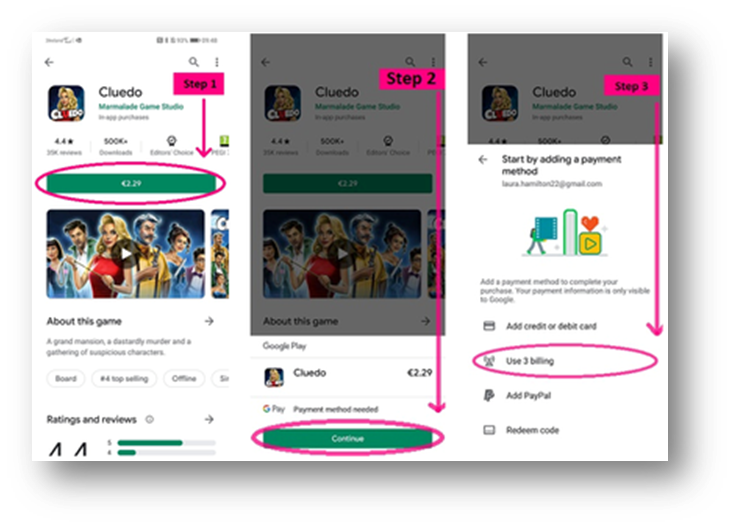
Going forward, when you are making purchases, 3 Billing will be your default payment option and you will receive a text and email to confirm any purchases made. It couldn't be easier!
Apple App Store
Similarly, on the App Store, there are just a few quick steps to set up 3Pay and have the option of purchasing all of the apps you could possibly need.
- Open your Settings and click on your Apple ID to find 'Payment and Shipping'. You will then be asked to sign in.
- Select 'Add Payment Method'.
- Tap on 'Mobile Phone' and enter your phone number. You will then be sent a text to verify your identity.
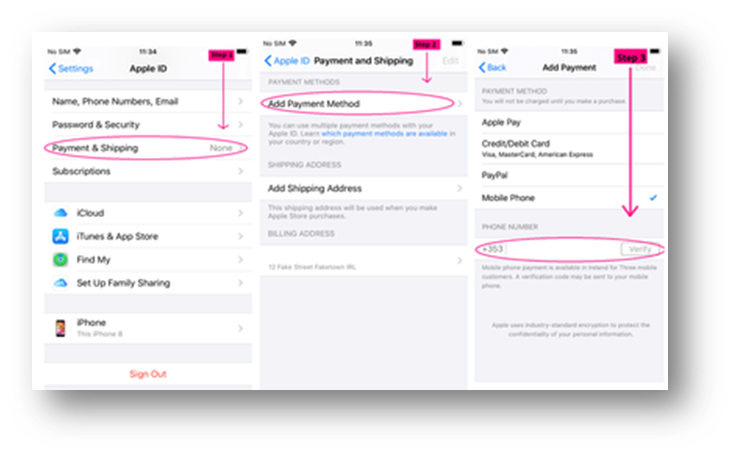
As with Google Play, once your purchase is complete you will receive a text and email confirming it.
Subscriptions
As well as buying apps, movies, and books through the online store, you can also pay for some app subscriptions. We will use a Disney+ subscription as an example in this blog.
To pay for your Disney+ subscription, using your phone credit or bill, simply download the app through the App Store or Play Store. You will then need to sign up to Disney+, so enter your personal details, and once you reach the payment screen, select 3 as your payment method.

Tips and Tricks
Sometimes things don’t go exactly to plan, so have a look at the below troubleshooting tips and tricks if you run into any problems.
- Clear your history.
- Delete 3Pay as a payment method and then re-add it.
- Know your limits! You can spend up to €50 per transaction, €100 per day, or €150 per month using 3Pay.
- You must have an Irish address registered to your Google and Apple accounts.
- Keep an eye on your payments in My3, so you can keep track of your purchases. (Not registered on My3 yet? Sign up for My3 by clicking here!)
3Pay Services
Click here for more
|
Service Provider |
Service Details |
How to use? |
Support Details |
| Google Play |
Purchase apps, books, games, and music on the Google Play Store. |
Visit the Google Play Store on your phone or tablet. |
Click here for support |
| Apple App Store |
Purchase apps, games, music and more on the Apple App Store. |
Visit the Apple App store on your phone or tablet. |
Click here for support. |
| Huawei App Store |
Purchase apps, games, music and more on the Huawei App Store. |
Visit the Huawei App store on your phone or tablet. |
Click here for support. |
|
Boku |
Virtual credits for online games |
Call 01 6572534 or visit boku.com/help |
|
|
Teclic |
Done Deal |
Email [email protected]
|
|
|
Telclic |
Park by Text |
Text TEMP, the car park code and your registration number to 51155 |
Email [email protected] |
|
Telclic |
Car Valuation |
Text VALUE and the car registration to 51155 |
Email [email protected] |
|
Adverts.ie |
Payment of classified adverts |
Email [email protected] |
|
|
Phonovation |
ParkingTag.ie |
Email [email protected] |
|
|
Epic Store |
Fortnite |
Download Fortnite from the Epic store |
To manage your subscriptions, please see the links below.
To manage a subscription through GooglePlay Store click here
To manage a subscription through the Apple App Store click here





GO3 Agent Feedback
Use the comment box below to leave feedback on the content of this article.
If you would like to receive a response in relation to your feedback, please provide your email address.
For gO3 issues or improvement suggestions, leave your feedback in the Frontline Connect Survey.
Labels
-
3Arena
1 -
3Olympia
1 -
3Services
1 -
adult content filter
1 -
App
1 -
Bill Pay
2 -
Calls Emails & Messaging
2 -
Combo Offers
1 -
Community
1 -
Customer Care
1 -
Emergency Calls
1 -
eSIM
1 -
Joining Three
1 -
Loyalty
1 -
Messaging
1 -
My Account
1 -
My3
1 -
New to Three
1 -
ODA
1 -
On Device Transfer (ODT)
1 -
Online Child Safety
1 -
Online Orders
1 -
Other Products
4 -
Other Services
17 -
Porting Issues
1 -
Prepay
1 -
presale
1 -
Promo Codes
1 -
Proof of purchase
1 -
Real Time Text
1 -
Roaming
2 -
RTT
1 -
Smartwatch
1 -
Smartwatch Share
1 -
Social Media
1 -
Three
1 -
Three Recycle
1 -
Three Trade In
1 -
Three+
7 -
Three+ Cinema
1 -
Three+ Competion
2 -
Three+ Competition Winners
1 -
VAT receipts
1 -
Voice
1 -
Voice Firewall
1 -
Voicemail
1 -
webtexts
1 -
Wi-Fi Assist
1 -
WiFi Calling
1
- « Previous
- Next »