There is a nifty feature on the Google 8 Pro and other Pixel devices.
It's located on the back of the Pixel 8 Pro, Pixel 9 Pro, and Pixel 10 Pro, just under the flash on the rear camera island/visor (it's not included in base Pixels or the A series). It's the rare smartphone hardware feature that's hiding in plain sight in a very low-key way, but that is very easy to forget about.
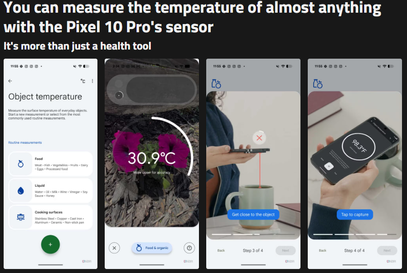
While you can use the Pixel 10 Pro's temperature sensor on yourself, friends, and family (as long as you see the option in your app — see the note above), I find it's far more useful with other objects. The sensor algorithm has three official category settings: food, liquid, and cooking surfaces, opening it up to a wide variety of use cases. For example, ifyou're wondering whether the pan you just finished cooking with is cool enough to clean, or whether you can use it to cook something else yet, the temperature sensor can let you know (keep in mind that it maxes out at 392°F/200°C).
If there's a particularly cold area around your window or sliding door, you can also use the Pixel 10 Pro's temperature sensor and thermometer app to find the leak and patch it with a bit of filler.