- 3Community
- :
- Ask About Devices
- :
- Apple Devices
- :
- Re: Error when connecting Apple Watch to three mob...
Options
- Mark Topic as New
- Mark Topic as Read
- Float this Topic for Current User
- Bookmark
- Subscribe
- Mute
- Printer Friendly Page
Error when connecting Apple Watch to three mobile service


02-11-2025
08:27 PM
- Mark as New
- Bookmark
- Subscribe to updates
- Mute
- Permalink
- Report this post
02-11-2025
08:27 PM
Error when connecting Apple Watch to three mobile service
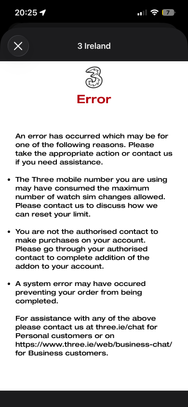
When I attempt to connect my Apple Watch to my iPhone using the watch app on phone, I receive the below error.
how do I resolve this? I have the smart watch add on added to my package. I went into the shop last week to have this set up specifically. I was told it was all good to go so, disappointing now I can’t seem to connect .
21 REPLIES 21

21-01-2026
06:28 PM
- Mark as New
- Bookmark
- Subscribe to updates
- Mute
- Permalink
- Report this post
21-01-2026
06:28 PM
Hi Niall, I'm having a similar issue to James_57538 . I've been in touch with a few in the corporate care department but that same error message persists for me and I'm unable to just get it working (including after un-pairing and re-pairing, and multiple eSims issued. Would you be able to have this investigated for me, possibly the same fix will apply to my device too, but at the moment It seems like I'm following all instructions but still get the same error "consumed the maximum number of watch sim changes allowed", let me know if you need any other account details from me to investigate or happy to visit a branch if that might solve the issue faster.

22-01-2026
09:35 AM
- Mark as New
- Bookmark
- Subscribe to updates
- Mute
- Permalink
- Report this post
22-01-2026
09:35 AM
Hey @David_23862 , thanks for posting here, if you have been dealing with our corporate care department I would recommend contacting them directly on 1913 and they can either request for the limit to be reset or if this fails raise it with the technical team to investigate further.
- « Previous
- Next »